Image Diff

Find the differences between two images, pixel by pixel. Every pixel that changed lights up, and nothing else does. Free, in your browser.
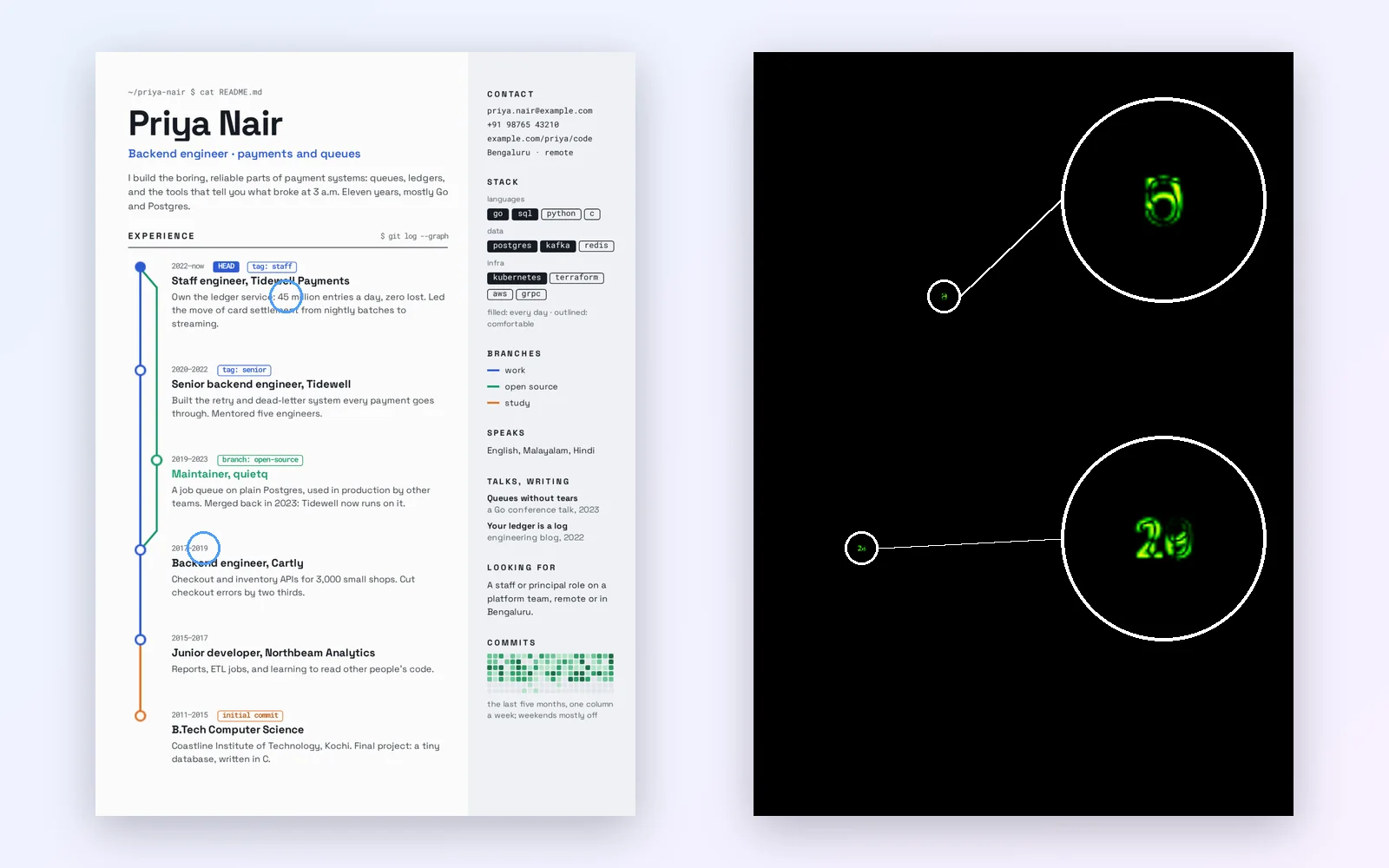
A developer's résumé beside its pixel diff: the map is black except for the two numbers that changed, 40 to 45 and 2020 to 2019, circled and enlarged
A
Before
B
After
Drop both images, browse your files, or paste a screenshot. JPG, PNG, WebP, GIF.
Nothing is sent anywhere. It runs in this tab.

How to compare two images pixel by pixel

1

Drop both images

Before and after, at once. They open together in the Compix editor, already showing the diff.
2

Read the map

Black means identical. Anything lit has changed, and the brighter the colour, the bigger the change.
3

Look again, then save

Blink or slide between the two to see what the change looks like, then export a still or record the comparison as MP4 or GIF.

How to read a pixel diff

Each pixel of A is compared with the pixel in the same place in B. Its value is the biggest change in red, green or blue, from 0 to 255, and the colour shows that value.
0 · identicalsmallmedium255 · largest
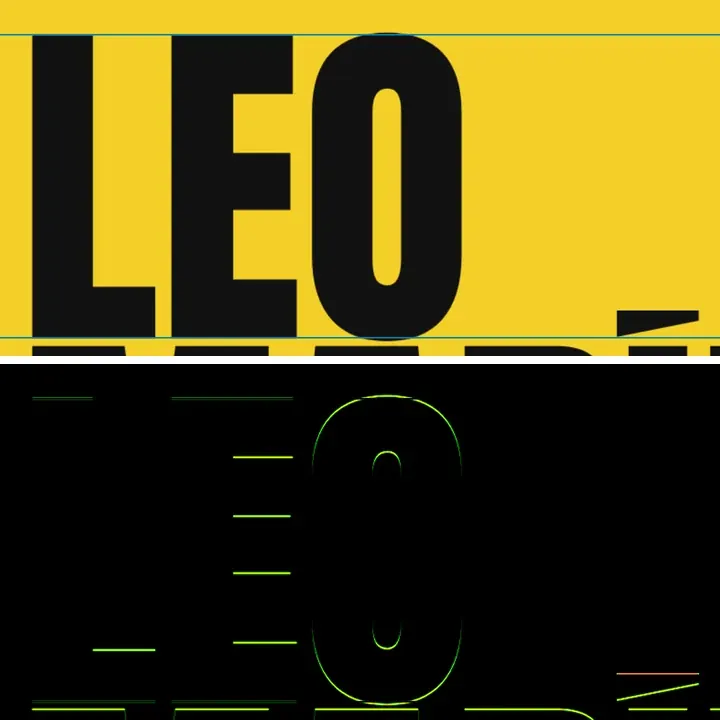
A big-type résumé name above its diff after the letters moved down 3 pixels: only the outlines of the letters are lit

Something moved

A shift of a few pixels draws the outline of whatever moved. The inside stays dark, because a solid shape still covers itself.
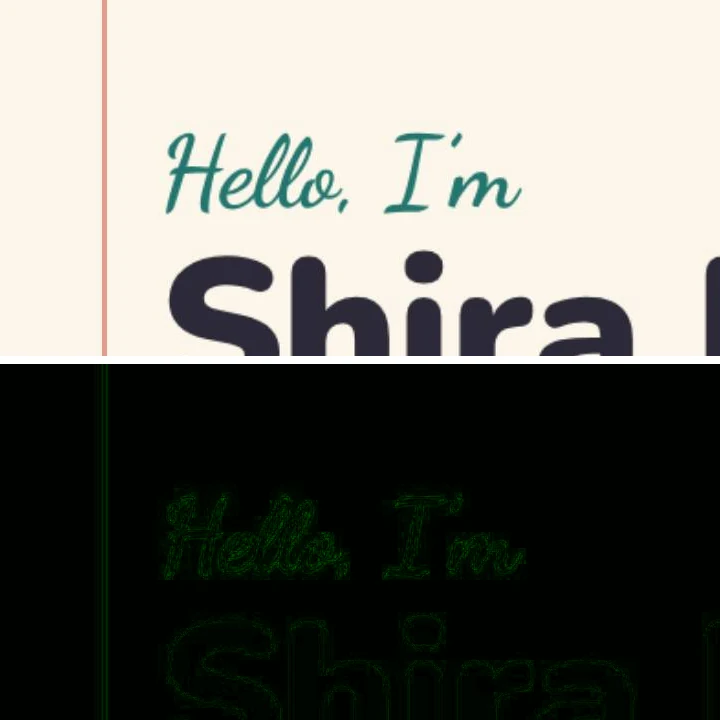
A résumé heading above its diff after the page was re-saved as a JPEG: a faint green ghost of every letter

It was saved as JPEG

Re-saving changes almost every pixel a little. The map shows a faint green ghost of every edge: real, but small.
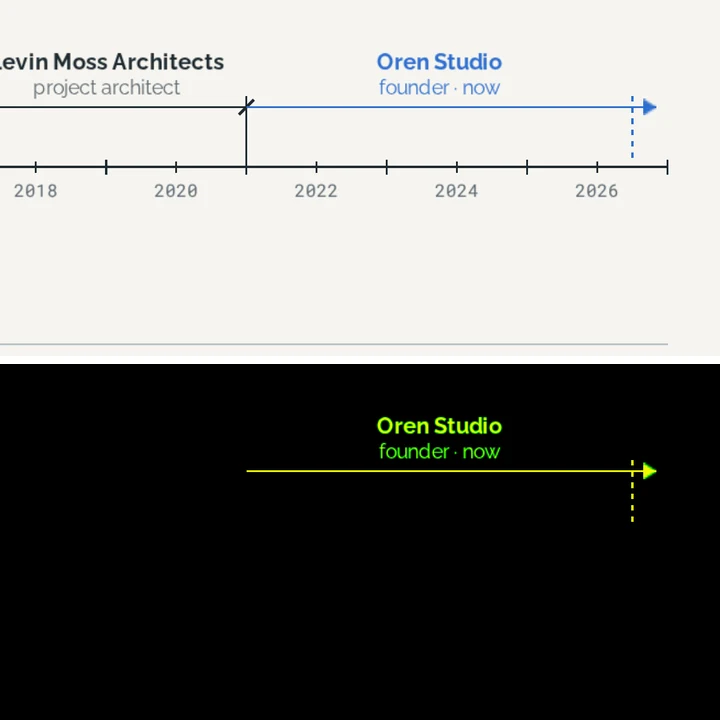
An architect’s career timeline above its diff after the red accent became blue: only the recoloured line and words are lit

A colour changed

Recolour one accent and exactly those shapes and words light up, as bright as the change is big.

Every changed pixel, no threshold

There is no sensitivity slider. Only an exact match stays black, so a change of one step in one channel still shows, faint green on black. A threshold decides for you which changes are too small to matter; here you see them all and decide yourself.

When the map shows a faint glow and you are not sure it matters, switch to blink. The two images swap in place, and if your eye does not catch the change, nobody else will either. The diff answers where and how much. It does not reduce the pair to a single score.

Images of different sizes

Both images are fitted into one frame at the size of the larger one, centred, never stretched and never cropped. Two versions with the same shape line up even at different resolutions, like a 1080 px export against its 2160 px original, though the smaller one is scaled up to match and the scaling itself leaves a faint glow. When the shapes differ, the empty bars where one image does not reach count as difference.

A pixel diff is strict about framing. If one capture sits a single pixel lower, every edge downstream lights up, and the map is right: those positions really do hold different pixels. When that happens, crop both to the same frame and compare again.

Pairs up to about 16 megapixels are compared at full resolution. Larger ones are scaled down to that size first. The work runs off the main thread, so the page stays responsive while a big pair is compared.

Compare screenshots online

Screenshots are the most common thing to diff, and the easiest to get wrong. A few habits make the map show your change and nothing else:

  • Capture both at the same window size, browser zoom and screen. A different display scale changes the size of everything.
  • Save as PNG. A JPEG screenshot lights up every edge with compression noise.
  • Hide what changes by itself: the cursor, a blinking caret, clocks, dates, animations, ads.
  • Paste straight from the clipboard: on this page, Ctrl+V or Cmd+V hands a screenshot to the editor.

Four more ways to look at the same pair

The diff proves a change. These show what it looks like. All five are one click apart in the same frame, on the compare images tool.

Blink

A and B swap in place. Anything that moved or changed flickers, which is the fastest way to catch a small change by eye.

Slider

Drag a line across the pair to wipe from one to the other. Best for an edit in one region.

Fade

One dissolves into the other, so a shift in colour or light across the whole frame shows at once.

Side by side

Both whole images next to each other, for choosing between two versions rather than finding a change.

What people use a pixel diff for

UI screenshots

Before and after a change to a page or an app screen. Check that a fix to the button did not also move the header.

Export and compression

Your original against the exported JPG or WebP, to see where the compression shows and how far you can push it.

Design revisions

The client says only the date changed. The diff shows whether that is true.

Print proofs

The approved file against the final one before it goes to print, down to a single character.

Cross-browser rendering

The same page captured in two browsers: font rendering, spacing and colour differences in one map.

AI edits

An inpainted or upscaled image against its source, to see what else the edit touched.

For developers: the manual pixel diff

If you searched for the pixel-diff npm package, pixelmatch, odiff or Resemble.js: those are libraries you call from code, and for assertions in a test suite they are the right tool. Percy, Chromatic and BackstopJS run visual tests in your pipeline on every change. This page is the manual check before any of that: two images, one map, no install.

The method differs from pixelmatch, so the same pair can light up differently. Compix compares raw red, green and blue values with no threshold and no special treatment of anti-aliased edges. Pixelmatch measures perceived colour difference, skips anti-aliased pixels by default and uses a default threshold of 0.1, so it ignores changes this map will show.

What happens to your pixels

It stays on your device

The diff is computed in your browser. Your images are never sent to a server.

You can check it

Open your browser's network panel and compare two images: no request carries them.

No account needed

Compare and download for free. Sign in only to save your designs.

Questions

How do I compare two images pixel by pixel?+
Drop both images on this page. They open in the Compix editor already in Diff, where every pixel that differs between the two lights up and every pixel that matches stays black.
What is a pixel diff?+
A map of the differences between two images, position by position. Each pixel of one image is compared with the pixel in the same place in the other, and the map shows where they differ and by how much.
What do the colours mean?+
Black means the two pixels are identical. Faint green is a small change, yellow a medium one, and orange to red a large one. The value is the biggest change in the red, green or blue channel, from 0 to 255.
Can I set a threshold or sensitivity?+
No. Every changed pixel shows, and only an exact match stays black. To judge whether a faint change matters, switch to blink or fade and look at it.
Can I compare images of different sizes?+
Yes. Both images are fitted into one frame at the larger size, centred, without stretching or cropping. Two versions with the same shape line up even at different resolutions. If the shapes differ, the empty bars count as difference.
Why is everything lit up?+
Usually the two images are not framed the same. A shift of one pixel, a different crop or a resize makes every edge light up, because the same position now holds a different part of the picture. Crop both to the same frame and compare again.
Can I compare two screenshots?+
Yes. Drop them, or paste a screenshot straight from the clipboard. Take both at the same window size and zoom, as PNG, so the diff shows the change and not the capture.
Does it give a percentage of difference?+
No. The map shows where the images differ and by how much, pixel by pixel. It does not reduce the pair to a single number.
How is this different from Percy or Chromatic?+
Percy, Chromatic and BackstopJS run visual tests in your build pipeline on every change. This is the manual check: two images, one map, no setup.
Is it free?+
Yes. Comparing and downloading need no account and cost nothing. An account saves your designs.
Are my images uploaded?+
No. The diff runs in your browser on your own device, and the images are never sent to a server.
Which formats can I compare?+
JPG, PNG, WebP and GIF. A GIF is compared as its first frame, and the two images can be in different formats.
Drop two images and see what changed
No account needed to compare and download. Sign in when you want to keep it.
Drop the before and the after
or browse your files