Logo Maker

Start from a logo template or a blank square, put in your name, pick the fonts and colors, and download a PNG with a transparent background. Free, in your browser.
Start a blank logo
A 500 × 500 square. Logo templates are one click away inside
Make a logo
Templates ready for your nameTransparent PNGNo watermark free
No account needed. It opens in the Compix editor, in this tab.
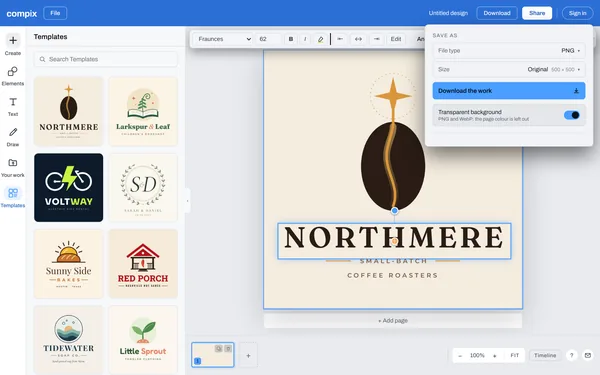
The Compix editor with the Northmere Coffee logo template open, the logo templates beside it, its name selected in the Fraunces font, and the Download menu on PNG at 500 x 500 with Transparent background on

How to make a logo

  1. 1

    Pick a template or start blank

    Click a template on this page, or Make a logo for a blank 500 by 500 square. In the editor, Templates, then Logo, lists every logo template.

  2. 2

    Put in your name

    Double-click the sample name and type yours. Do the same for the tagline, or select it and press Delete to leave it out.

  3. 3

    Change the fonts and colors

    With a word selected, the bar above the page changes its font and its color. With nothing selected, its color tile changes the background.

  4. 4

    Add a shape or a graphic

    Open Elements for shapes and graphics. A shape takes any color you pick, and its corners size it. Your own picture comes in from Your work.

  5. 5

    Download it

    Press Download. For a still logo the menu is on PNG: turn on Transparent background and press Download the work. If something in it moves, the menu opens on MP4.

The files you get

Pick the file type in the Download menu. Each one is your logo at its page size, 500 by 500 pixels from a template.

PNGFor your website, profiles and anything you lay it on. With Transparent background on, the page color is left out.
WebPThe same picture for the web as a WebP. It keeps a transparent background too.
JPGFor places that ask for a JPG. It always has a background.
PDFThe logo on a page of its own, to send or print.
MP4 or GIFOnce something in your logo moves, from Animate.

What makes a good logo

It is simple

One drawing, one or two fonts, two or three colors. A logo is seen for a second, often in a corner.

It reads small

Picture it as small as a profile picture or a browser tab. If the name is still clear at that size, it works on a phone screen too.

It works in one color

A logo that still reads in black on white prints well anywhere: on a stamp, a receipt, a shirt or a sticker.

It fits the business

Heavy letters for a gym, a script for a bakery, clean lines for a tech company.

Questions

How do I make a logo?+
Pick a logo template on this page, or press Make a logo for a blank square. It opens in the Compix editor. Double-click the sample name and type yours, change the fonts and colors in the bar above the page, then press Download, turn on Transparent background and press Download the work.
Is this logo maker free?+
Yes. Making a logo and downloading it needs no account, no trial and no payment, and adds no watermark. Sign in only if you want the design saved online, to open on your other devices.
Can I download my logo with a transparent background?+
Yes. In the Download menu, keep PNG (or pick WebP) and turn on Transparent background. The page color is left out, so only your words, shapes and drawing are in the file. A JPG always has a background.
What size is the logo?+
A logo template and Make a logo open a 500 by 500 pixel square, and the logo downloads at that size: right for a website header, a profile picture or an email signature. For print, such as a banner or a truck door, start a blank design at a bigger custom size from Create, up to 16,384 pixels a side.
Can I download an SVG or a vector file?+
Not yet. Compix downloads a logo as a PNG, a JPG, a WebP or a PDF. Each is the logo at its page size, in pixels.
Can I change the colors of a template's drawing?+
A template's drawing keeps the colors it was made with: you can move it, make it bigger or smaller, or delete it. The words, the lines, the background and any shape you add take any color.
Can I add my own picture or a graphic?+
Yes. Open Elements for shapes and graphics, or Your work to bring in a picture of your own, and click one to put it on the logo. Drag its corners to size it.
Can I animate my logo?+
Yes. Select the name or the drawing and give it a move from Animate, such as Fade, Pop or Type. A logo that moves downloads as an MP4 or a GIF: the Download menu opens on MP4.
Can I trademark my logo?+
Not one with a Compix template or other Compix content in it. You can use a logo template, or other Compix content, in your business's logo, but everyone can use the same templates and elements, so you can't register that Compix content as a trademark, or as part of one, or stop others from using the same template or elements in their own designs. If you want a logo you can register as a trademark, draw your own mark.
Is my logo uploaded?+
No. The logo is made and saved in this browser tab, on your device. Nothing is sent to a server for that. If you sign in to save your work, the design is kept online so it opens on any device.
Make your logo
No account needed to make and download a logo. Sign in when you want to keep the design.
Make a logo