You can't see character drift
by comparing images side by side.
Nobody told you this. But it's why you keep picking the wrong generation.
When you put two AI images side by side, your brain compares a perception to a memory, not two perceptions simultaneously. A 4-pixel eye shift is invisible. A jaw that widened by 3% is invisible. Hair that moved slightly is invisible. You're not comparing images. You're comparing what you see now to what you remember from half a second ago. That's a memory test. Not a consistency check. Compix runs the real check in your browser: load up to 50 generations, set the one you trust as the anchor, and blink between them so drift moves instead of hiding. Nothing uploads, and comparing needs no account.
SEE IT WORK
Drift you can see in two seconds
Character drift hides from side-by-side viewing because your eye compares by memory. Alternated in place, the face, the outfit and the accessories each declare themselves.
Every tutorial teaches you how to prevent drift.
Nobody teaches you how to detect it after generation.
LoRA, IP-Adapter, InstantID, --cref, --oref, seed locking, reference weights. The entire AI art world is fighting drift at the generation level. Trying to stop it before it happens. But drift still happens. And when it does, you're staring at 50 images trying to figure out which ones held consistency. With no tool. With only your eyes. Side by side.
What happens when you compare side by side
Your eye moves between two images. Your brain registers image A. Your eye moves to image B. Your brain tries to compare what it sees to what it remembers. But visual memory degrades in under a second. A 4-pixel eye drift, a jaw that subtly widened, hair that moved 8 pixels to the left: completely invisible. You decide they look the same. You pick one. You continue. Three scenes later you realize you've been working with an inconsistent character for an hour.
What happens with blink comparison
Both images alternate at the same pixel coordinates, 300 times per second if you want. Your eyes don't move. Your visual system, which evolved to detect motion, does all the work. A 4-pixel eye drift screams at you as motion. A jaw that widened appears to pulse. Hair that moved flickers. Consistent elements are completely invisible: no motion means no drift. You know in 3 seconds. Not 3 minutes of squinting.
The 5 drift signs — and which check catches each
1. Face geometry creep : eyes migrate, jaw narrows across a batch. Caught instantly by the blink test: geometry jumps read as motion. 2. Palette shift : the outfit's teal slides toward green by image six. The per-pixel diff lights the hue delta the eye adapts to. 3. Accessory loss : the earring or belt buckle silently vanishes. Blink against your anchor; missing objects flash like a strobe. 4. Style wobble : rendering shifts from painterly to plastic. The split wipe across matched regions makes it undeniable. 5. Proportion drift : head-to-body ratio slips batch to batch. Stack them in the scene compositor at equal scale and measure. When you find drift: don't regenerate: combine the drifted image's good parts with your anchor's correct ones.
Same two generations. Side by side vs blink.
The face drifted 6 pixels. Invisible side by side. Impossible to miss in blink.
Both comparisons show the exact same two images. One hides drift. One makes it unmissable.
Blink. Diff. Split. Each catches something the others can't.
One mode isn't enough. Different types of drift are visible in different modes. Use all three.
Blink: motion reveals drift
Alternates your anchor and comparison at adjustable speed. Your visual system detects motion, not difference. A character that shifted 4 pixels appears to jump. Consistent elements disappear: they produce no motion. Set speed to 300ms for detailed inspection. Fast for gross drift. Slow for subtle texture and color inconsistencies.
Best for: detecting any drift fast across a large batch. Check 50 generations in under 2 minutes.

Diff: measure drift mathematically
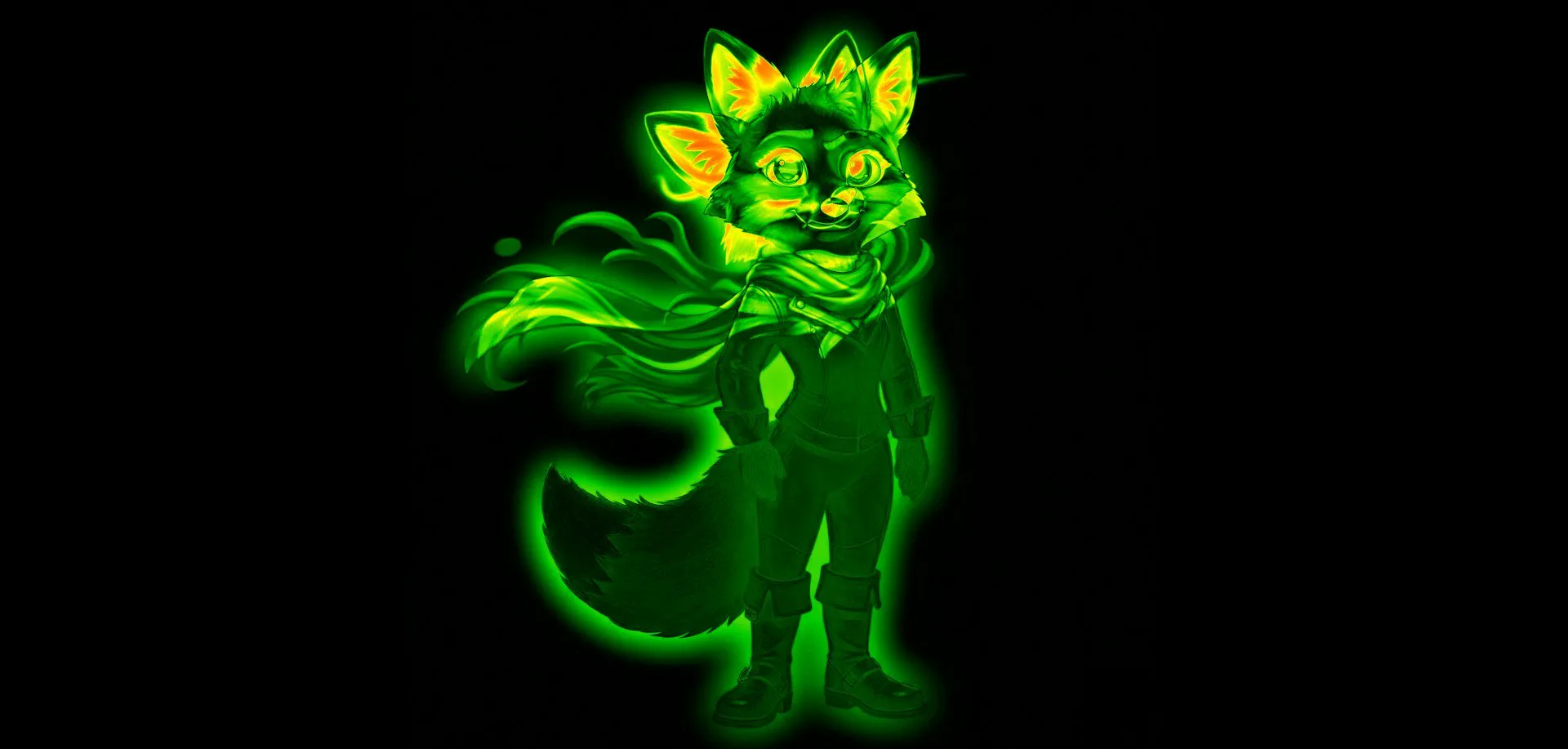
Generates a pixel-difference heatmap between your anchor and any comparison image. Changed pixels glow. Unchanged pixels stay dark. Face drifted? The face region glows. Pose shifted? Body outline glows. Background stayed consistent? Stays completely dark. You're not guessing at consistency: you're measuring it at pixel level.
Best for: knowing exactly which regions drifted and how much. Identifying which generations are actually consistent.
Split wipe: inspect at pixel level

Drag a divider across both images simultaneously. Left side shows your anchor. Right side shows your comparison. Drag across the face: see exactly where consistency breaks. Drag to the eyes: see if they're at the same position. Zoom to 400% and inspect individual pixels. The exact boundary where drift begins is visible.
Best for: confirming a specific drift you spotted in blink or diff. Inspecting exactly what changed in a region.
Pixel lock. Why most comparison tools give you false results.
Every AI generator produces images where the character sits at slightly different positions on the canvas, even across consistent generations. When you compare without pixel lock, blink comparison shows positional drift even when the character itself is perfectly consistent. You think you have drift. You don't. Your comparison is lying to you.
Without pixel lock
Image A has the character at canvas position 240, 180. Image B has the exact same character at position 243, 182: 3 pixels right, 2 pixels down. Blink comparison without pixel lock shows the entire character as "drifted" even though the face, pose, and style are identical. You're seeing canvas position noise, not actual character drift. You throw away a perfectly good generation.
With pixel lock: how Compix works
Compix scans the content bounds of every image in your batch and locks them all to the same coordinate space. Canvas position noise is eliminated. What you see in blink is only actual character change: face movement, pose shift, style inconsistency. Not canvas positioning artifacts. Your comparison is accurate. Your decisions are based on real data.
From 50 generations to confirmed consistency in 2 minutes.
This is the workflow that doesn't exist inside any generator. It happens after.
Set your anchor
Drop your reference: the generation you consider your strongest character representation. This is what everything else gets compared against. It doesn't have to be perfect. It just needs to be your baseline.
Load your entire batch
Drop all your generations at once. Up to 50 images. Pixel-lock them in one click: content-scanned and aligned to the same coordinate space. No manual alignment. No Canva. No Photoshop layers. Drop and done.
Blink through everything
Hit play at 300ms. Watch. Drifted generations scream at you as motion: face jumps, pose shifts, style flickers. Consistent generations are silent: no motion, no drift. You've found your consistent ones without looking at a single image individually.
Confirm with diff and split
Switch to Diff on anything that looked borderline in blink. The heatmap shows exactly which pixels changed. Drag the split wipe across the face to confirm. You're not guessing anymore. You know.
Drifted images are not failures.
They're variation material.
The AI art world treats drifted generations as wasted compute. Generate again. Try another seed. Add more reference weight. But the drifted image you just threw away might have had a perfect expression. A perfect hand gesture. A lighting moment you couldn't prompt for. The drift was in the wrong place, not everywhere.
The diff heatmap shows you exactly what drifted
Load a drifted generation. Switch to Diff. The heatmap glows where change happened. If the face drifted but the lighting and background are perfect, you know. The diff tells you which regions are salvageable and which aren't. You're not throwing away the whole image. You're reading it.
See also: How to get more variations from 5 AI images than your generator gave you from 50 →
Freeform shape extraction: isolate what's usable
The diff showed you the face drifted but the pose is perfect. Use Compix's freeform shape tool to isolate exactly that region: draw the shape around the pose, extract it as an invariant state. Now you have a variation your generator never actually gave you. Pixel-locked. Ready to composite. The "failed" generation became usable material.
"Very consistent" is a spectrum. Where did yours land?
The generation side admits this openly: a character reference produces a range of results, from very consistent to merely recognizable as the same person, never pixel-identical. The official guidance says it plainly: intricate details may not perfectly match your reference. What no generator ships is the next step, a way to check whether they did. Every tutorial teaches you how to aim the machine. None of them answers where your batch actually landed.
Checking is the part that takes two minutes, not two hundred credits. Load the reference as the anchor and your generations against it, then blink: identity drift is exactly what alternation surfaces, because a face that holds sits still and a face that drifted visibly moves. The spectrum stops being a feeling and becomes something you watched happen, image by image, with the receipts to pick your keepers by.
If you generate batches and pick the best one, this is for you.
Stable Diffusion & Forge users
You generate 20–50 images per session with different seeds, CFG scales, or sampler settings. You alt-tab through the output folder trying to pick the most consistent character. You know drift is happening. You can't quantify it. Blink comparison and pixel diff give you the comparison tools your output folder never had.
ComfyUI users
The Image Comparer node compares two images. That's the ceiling. When you have a batch of 30 outputs and need to find which seeds held character consistency, you're back to manual inspection. Compix handles 50 at once, all pixel-locked, blink and diff across all of them.
Midjourney & Flux artists
You're scrolling Discord to compare older variations to new ones. You're screenshotting grids and stacking them in Canva. You're comparing a memory to a perception and calling it QA. Drop your exported variations into Compix: blink comparison tells you in seconds which ones actually held consistency across your --oref, --cref, or --sref workflow.
AI comic & storyboard artists
You need the same character to appear consistently across 20, 50, 100 panels. Every panel is generated. Every generation has potential drift. One panel with an eye that shifted 5 pixels breaks immersion for readers. Blink comparison catches that panel before it becomes a problem. Diff heatmap tells you exactly how much it drifted.
Questions about drift detection
Why can't I see character drift when comparing AI images side by side? ▸
What is pixel lock and why does it matter for AI image comparison? ▸
Does this work with my Stable Diffusion output folder? ▸
How is this different from the Image Comparer node in ComfyUI? ▸
Are my AI-generated images safe? I work with unreleased characters. ▸
Detection is step one. Combining the best parts is step two.
Combine the Best Parts From Each Image
The face from image 3, the outfit from image 7, the accessories from image 9. Draw freeform shapes on each region and get every possible combination: 6,500+ from 9 images. Combine now →
Create 6,500+ Variations Without Regenerating
Your drifted generations aren't failures: they're variation material. Freeform shape extraction turns any region of any image into a usable variant. See the math →
Pixel Diff Heatmap
The mathematical layer under the blink. Every changed pixel glows. Every consistent pixel stays dark. See exactly what drifted and how much. Open diff tool →
The Combinatorial Engine
How the combination engine extracts and reassembles pixel regions: deterministic, not AI-blended. The formula behind 6,500+ variations. How it works →
Midjourney Drift?
Your character reference didn't hold. Combine the best face from one grid image with the best outfit from another, without re-prompting. Midjourney guide →
SD Batch Drift?
Your LoRA batch drifted across seeds. Skip re-running the pipeline: combine the best regions from outputs you already have. SD workflow →